AI Tools Every Startup Must Use to Scale Faster in 2026

Startups in 2026 are scaling faster than ever, not by hiring large teams, but by leveraging powerful AI tools. From automating customer support to generating marketing content and writing code, AI has become a core growth engine. For startups in Australia, where competition and operational costs are high, AI tools help improve efficiency, reduce expenses, and accelerate growth.

    Why AI Tools Are Essential for Startup Growth
    AI tools enable startups to automate repetitive tasks, make smarter decisions using data, and improve productivity across teams. Instead of spending hours on manual work, founders and employees can focus on innovation, customer experience, and strategic expansion. This results in faster scaling with fewer resources.

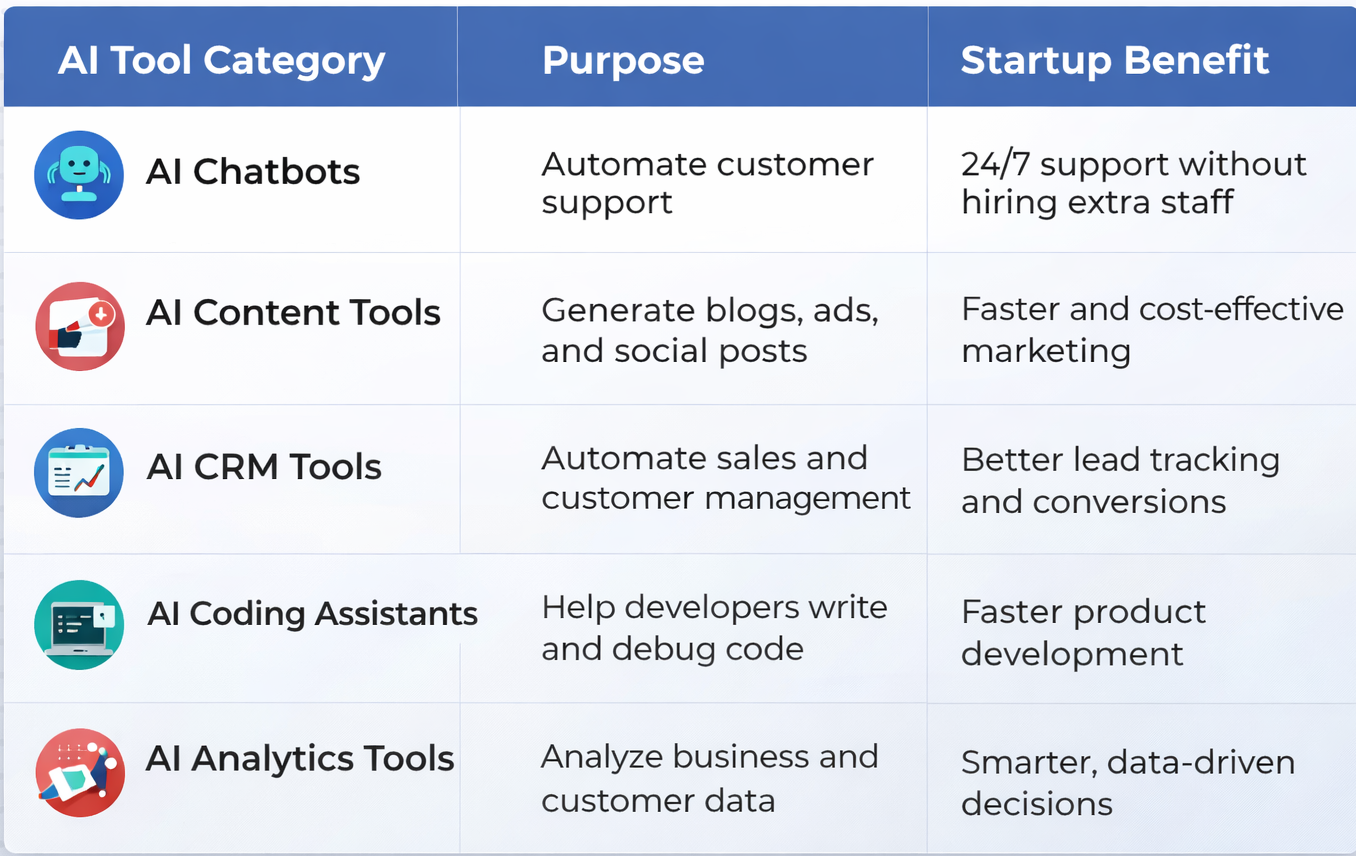
    Key AI Tool Categories Every Startup Should Use

    Major Benefits for Australian Startups

  • Cost Reduction:
  • AI reduces the need for large operational teams.

  • Faster Growth:
  • Automates marketing, sales, and development tasks.

  • Improved Productivity:
  • Teams can focus on high-value work.

  • Better Customer Experience:
  • AI provides instant and personalized support.

  • Competitive Advantage:
  • Startups using AI scale faster than traditional businesses.

    The Future of Startup Scaling with AI
    In Australia’s fast-growing startup ecosystem, AI is no longer optional, it is essential. Startups that integrate AI tools early can launch products faster, acquire customers more efficiently, and scale operations with minimal overhead. In 2026 and beyond, AI will continue to be the foundation of successful, scalable startups.

Why Autonomous Marketing Is the Next Big Shift

Marketing is entering a new era, autonomous marketing. Unlike traditional marketing automation that follows pre-set rules, autonomous marketing uses AI and machine learning to make decisions, optimize campaigns, and adapt strategies in real time with minimal human intervention.


    What Is Autonomous Marketing?
    Autonomous marketing systems analyze customer behavior, predict intent, and automatically execute the most effective actions—whether it’s sending a personalized message, adjusting ad spend, or changing content formats. These systems learn continuously, improving performance with every interaction.

    Why It’s Gaining Momentum
    Modern customers expect instant, personalized, and relevant experiences across all channels. Manual campaign management can’t keep up with this demand.

    Autonomous marketing enables:

  • Real-time personalization at scale
  • Faster decision-making driven by data
  • Reduced operational workload for marketing teams
  • Higher conversion rates through continuous optimization
  • How It Changes the Marketer’s Role
  • Rather than replacing marketers, autonomous marketing shifts their focus from execution to strategy, creativity, and oversight. Teams define goals and guardrails, while AI handles the optimization and execution.

    The Future Outlook
    As AI becomes more advanced, autonomous marketing will move from being a competitive advantage to a business necessity. Brands that adopt it early will deliver smarter customer experiences, adapt faster to market changes, and achieve sustainable growth.
    Autonomous marketing isn’t about losing control, it’s about marketing that thinks, learns, and evolves on its own.

CDPs & Data Fabric Convergence: Integrating Customer Intelligence Across the Enterprise

The data landscape of 2026 has moved beyond simple collection; it’s now about orchestration. For years, Customer Data Platforms (CDPs) and Data Fabric architectures operated in separate orbits, one for the marketer, the other for the IT architect.

    Today, those orbits have collided. This convergence is the key to moving from “isolated insights” to enterprise-wide customer intelligence.

    Understanding the Players’

    Before we dive into the convergence, let’s define the two pillars:

  • Customer Data Platform (CDP):
  • A packaged software that creates a persistent, unified customer database accessible to other systems. It is the “brain” for marketing personalisation.

  • Data Fabric:
  • An architectural layer that connects disparate data sources (on-prem, cloud, and edge) using metadata. It is the “connective tissue” of the entire enterprise.

    The Rise of the “Composable” Model
    In the past, CDPs often created new silos. You would copy data from your warehouse into the CDP, leading to version control issues and high storage costs.

    In 2026, the trend is The Composable CDP. Instead of moving data, the CDP sits directly on top of the Data Fabric.

    This convergence solves three major enterprise hurdles:

  • Zero-Copy Integration:
  • The CDP uses the Data Fabric’s virtualisation to “read” customer data without duplicating it. This keeps the “Single Source of Truth” intact.

  • Extended Intelligence:
  • By linking with the Data Fabric, a CDP can now access non-marketing data, like real-time inventory or supply chain delays, to stop showing ads for out-of-stock products.

  • Automated Governance:
  • Data Fabric provides the “guardrails.” When a customer updates their privacy preferences in one system, the Fabric ensures that the CDP (and every other connected tool) respects that change instantly.

    The 2026 Insight: “Convergence isn’t about buying one giant tool; it’s about making your marketing brain (CDP) and your enterprise nervous system (Data Fabric) speak the same language.”

    The Next Step for Your Team
    The convergence of CDP and Data Fabric is no longer a luxury, it is the standard for any data-driven organization.

CDP vs CRM vs DMP: What’s the Real Difference

In today’s data-driven world, businesses are drowning in customer information, but only a few know how to use it right. That’s where CDPs, CRMs, and DMPs come into play. They all manage customer data, but each serves a very different purpose. Understanding these differences can transform how you personalise experiences, run campaigns, and grow your brand.

  • CRM:
  • Building Relationships, One Interaction at a Time
    A Customer Relationship Management (CRM) system is designed to track direct interactions, sales calls, emails, support tickets, tasks, and follow-ups.
    Think of it as your sales and service command centre, helping teams nurture leads and strengthen customer relationships.
    However, CRMs mainly store known customer data and don’t unify behaviour across channels.

  • DMP:
  • Anonymous Audience, Powerful Targeting
    A Data Management Platform (DMP) focuses on anonymous, cookie-based audience data used mostly for advertising.
    It helps marketers run targeted ad campaigns by segmenting users into interest groups.
    But DMP data is short-lived, high-level, and not meant for deep personalisation or long-term customer understanding.

  • CDP:
  • The Smart Brain of Customer Data
    A Customer Data Platform (CDP) is where the magic happens.
    It collects first-party data from every touchpoint, web, app, CRM, social, offline, and unifies it into one real-time customer profile.
    This makes it perfect for personalisation, automation, and predictive insights, giving businesses a true 360° view of each individual customer.

    The Real Difference (in one line each):

  • CRM
  • = Manage customer interactions

  • DMP
  • = Build anonymous ad audiences

  • CDP
  • = Unify and activate customer data for personalised experiences.

If CRM is your relationship manager and DMP is your advertising engine, then CDP is the central intelligence system that powers deep personalisation and smarter marketing. Together, they create a data ecosystem that drives higher ROI and unforgettable customer experiences.

The Art of Automation: Streamlining Graphic Development with AI Tools

In the fast-paced world of graphic design, automation has become a game-changer, offering efficiency, consistency, and creativity in the development process. This article delves into the art of automation in graphic design, exploring how AI-powered tools are revolutionising workflows and streamlining graphic development for designers.

  • Automated Image Editing:
  • AI-powered image editing tools, such as Adobe Photoshop’s Content-Aware Fill and Smart Objects, automate repetitive tasks like retouching, background removal, and color correction. These tools analyse images and intelligently apply adjustments, saving designers time and effort while maintaining quality.

  • Template-Based Design Systems:
  • Design systems built on templates and presets enable designers to automate the creation of consistent graphics across various platforms and formats. Tools like Adobe Illustrator’s Libraries and Sketch’s Symbols allow for the reuse of design elements, layouts, and styles, ensuring brand consistency and efficiency.

  • Generative Design Algorithms:
  • Generative design algorithms leverage AI to automatically generate design variations based on predefined parameters and constraints. These algorithms explore thousands of design possibilities, helping designers discover new ideas and iterate rapidly. Tools like Autodesk’s Dreamcatcher and Canva’s Design AI enable designers to explore creative possibilities efficiently.

  • Content Generation with AI:
  • AI-powered content generation tools, such as Artbreeder and Runway ML, assist designers in creating visuals by generating images, patterns, and textures based on input parameters. These tools use machine learning algorithms to synthesise new content, providing inspiration and assets for graphic projects.

  • Automated Layout and Composition:
  • AI-driven layout and composition tools analyse design elements and arrange them automatically to create visually appealing compositions. Plugins like Adobe’s Sensei and Affinity Designer’s StudioLink offer features such as auto-align, smart grids, and intelligent snapping, speeding up the layout process and ensuring balance and harmony in designs.

  • Smart Color Palette Generation:
  • AI algorithms can analyse images, brand guidelines, and design trends to generate custom color palettes tailored to specific projects. Tools like Coolors and Adobe Color CC use machine learning to suggest harmonious color schemes, helping designers make informed color choices quickly and easily.

  • Natural Language Processing (NLP) for Design Briefs:
  • NLP-powered tools assist designers in understanding project requirements and generating design concepts from written briefs. Platforms like Phrasee and Copy.ai analyse text input to generate design ideas, headlines, and copy, streamlining the creative brainstorming process.

  • Automated Export and Asset Management:
  • AI-driven asset management tools automate the export and organisation of graphic assets for various platforms and devices. Plugins like Sketch Runner and Zeplin streamline the export process, generating optimised assets and style guides automatically, saving designers time and reducing errors.

    Conclusion: Automation is transforming graphic development, empowering designers to work faster, smarter, and more creatively than ever before. By harnessing the power of AI tools for image editing, layout design, content generation, and asset management, designers can streamline workflows, boost productivity, and focus on what they do best: bringing their creative visions to life.
    Benefits of Process Automation: Unlocking Efficiency and Productivity Gains

    Process automation, driven by advancements in technology, has become a cornerstone in modern business operations. Automation involves the use of technology to perform routine tasks, streamline workflows, and enhance overall efficiency. This article explores the myriad benefits of process automation and how organisations across various industries can unlock significant gains in efficiency and productivity.

    1. Time Savings and Efficiency:

    • Reduced Manual Work: Automation eliminates the need for manual execution of repetitive tasks, allowing employees to focus on more strategic and complex aspects of their roles.
    • Faster Task Execution: Automated processes operate at speeds incomparable to manual efforts, significantly reducing the time required to complete routine operations.

    2. Error Reduction and Improved Accuracy:

    • Minimised Human Errors: Automation reduces the risk of errors associated with manual data entry and routine tasks, leading to more accurate and reliable outcomes.
    • Consistent Output: Automated processes ensure consistent and standardised outputs, eliminating variations that may arise from human involvement.

    3. Enhanced Scalability:

    • Adaptable to Workload: Automated systems can scale up or down based on workload demands, ensuring that organisations can handle increased volumes without compromising efficiency.
    • Flexibility in Operations: Scalable automation solutions provide the flexibility to adjust processes in response to changing business requirements.

    4. Improved Decision-Making with Data Insights:

    • Real-Time Data Analysis: Automation allows for real-time analysis of data generated by various processes, providing valuable insights for informed decision-making.
    • Data-Driven Strategies: Organisations can leverage automated analytics to develop data-driven strategies, optimising operations based on actionable insights.

    5. Enhanced Employee Productivity:

    • Focus on Value-Added Tasks: Automation frees up employees from mundane tasks, enabling them to focus on tasks that require critical thinking, creativity, and strategic planning.
    • Higher Job Satisfaction: By automating repetitive tasks, employees can engage in more meaningful work, leading to increased job satisfaction and motivation.

    6. Consistent Customer Experience:

    • Automated Customer Interactions: Automation in customer service and communication ensures consistent and prompt responses, enhancing the overall customer experience.
    • Personalisation at Scale: Automation enables personalised customer interactions at scale, tailoring communication and services based on individual preferences.

    7. Cost Savings:

    • Operational Cost Reduction: Automation reduces the need for manual labor, leading to significant savings in operational costs over time.
    • Resource Optimisation: Automated systems optimise the use of resources, minimising waste and inefficiencies associated with manual processes.

    8. Compliance and Risk Management:

    • Consistent Compliance: Automated processes adhere consistently to compliance standards and regulatory requirements, reducing the risk of non-compliance.
    • Risk Identification and Mitigation: Automation systems can monitor and identify potential risks, allowing organisations to implement timely mitigation strategies.

    9. Faster Response to Market Changes:

    • Agile Adaptation: Automated processes enable organisations to quickly adapt to changes in the market, competition, or customer preferences.
    • Rapid Innovation: With the efficiency gains from automation, organisations can allocate more resources to innovation and stay ahead in dynamic markets.

    10. Operational Visibility and Accountability:

    • Real-Time Monitoring: Automation provides real-time visibility into ongoing processes, allowing for proactive monitoring and immediate issue resolution.
    • Accountability through Auditing: Automated systems often include auditing features that track actions, promoting accountability and transparency in operations.

    Conclusion: Transforming Business Operations

    Process automation stands as a transformative force in modern business, offering a multitude of benefits that extend across operational, financial, and strategic dimensions. As organisations continue to embrace automation technologies, they not only unlock efficiency and productivity gains but also position themselves to thrive in an increasingly competitive and dynamic business landscape. The journey towards process automation represents a strategic investment in the future, where organisations can leverage technology to optimise operations, drive innovation, and achieve sustainable growth.


    Exploring animation tools that facilitate collaboration among remote teams.

    In the era of remote work, creative collaboration has become essential for teams working on animation projects. Animation tools that facilitate seamless collaboration are crucial for ensuring efficient workflows, enhancing communication, and bringing together the collective talents of remote teams. This article explores a range of animation tools designed to empower remote teams, foster creativity, and streamline the collaborative animation process.

    1. Google Drive (Jamboard):

    • Real-Time Brainstorming: Google Drive’s Jamboard allows remote teams to collaborate in real time, facilitating brainstorming sessions for storyboarding and idea generation.
    • Document Sharing: Seamless integration with Google Drive enables teams to share animation scripts, concept art, and other project documents effortlessly.

    2. Toonly:

    • User-Friendly Interface: Toonly offers a user-friendly platform for creating animated videos and explainer animations, making it accessible for team members with varying levels of animation expertise.
    • Cloud-Based Storage: Cloud-based storage ensures that animation files are easily accessible and shareable among team members regardless of their geographical location.

    3. Vyond:

    • Collaborative Editing: Vyond provides a collaborative environment where team members can collectively edit and refine animations, ensuring a smooth workflow.
    • Review and Feedback Features: Vyond’s review and feedback features simplify the review process, allowing team members to provide input and suggestions directly within the platform.

    4. Adobe Creative Cloud (After Effects and Premiere Pro):

    • Integrated Workflow: Adobe Creative Cloud’s After Effects and Premiere Pro enable a seamless integration of animation and video editing, supporting a comprehensive animation production workflow.
    • Cloud Storage and Libraries: Teams can leverage cloud storage and shared libraries for efficient collaboration, ensuring that everyone has access to the latest assets.

    5. Trello:

    • Project Management: Trello serves as an effective project management tool, allowing teams to organise animation tasks, set deadlines, and track progress collaboratively.
    • Integration with Animation Tools: Integration capabilities with various animation tools enable teams to link Trello boards with specific animation projects.

    6. Frame.io:

    • Video Collaboration Platform: Frame.io is designed specifically for video and animation collaboration, providing a platform for reviewing, commenting, and annotating video content.
    • Version Control: Robust version control features ensure that teams are working on the latest iterations, minimising confusion and enhancing collaboration.

    7. Blender Cloud:

    • Open Source Animation: Blender Cloud supports open source animation projects and collaboration, providing a platform for sharing assets, tutorials, and collaborative projects.
    • Cloud Rendering: Teams can leverage cloud rendering capabilities for resource-intensive tasks, enhancing efficiency in the animation production pipeline.

    8. Storyboard That:

    • Online Storyboarding: Storyboard That offers an online platform for collaborative storyboarding, allowing team members to contribute to the visual narrative remotely.
    • Customisable Templates: Customisable templates streamline the storyboarding process, ensuring a consistent visual language across the animation project.

    9. Wipster:

    • Video Review and Approval: Wipster streamlines the review and approval process for animations, providing a platform for collaborative feedback and annotations.
    • Time-Stamped Comments: Time-stamped comments enable precise feedback on specific frames, enhancing communication between team members.

    10. Loom:

    • Screencasting and Video Messaging: Loom facilitates communication through screencasting and video messaging, allowing team members to share ideas, provide feedback, and explain concepts visually.
    • Instant Sharing: Instant sharing of videos enhances real-time communication, fostering a sense of connection among remote team members.

    Conclusion: Fostering Creativity Across Distances

    The animation tools mentioned above serve as valuable assets for remote teams, offering collaborative features that bridge distances and enhance creativity. As the landscape of remote work continues to evolve, leveraging these tools enables animation teams to overcome challenges, streamline workflows, and collectively bring their creative visions to life. Whether it’s real-time collaboration on storyboards, seamless video review processes, or cloud-based asset sharing, these tools contribute to a collaborative ecosystem that empowers remote animation teams to thrive in a digital era.

    Collaborative Automation: Fostering Teamwork Between Humans and Bots

    The integration of automation technologies, including robots and artificial intelligence, into the workforce is transforming the way we work. Collaborative automation, a concept that emphasises teamwork between humans and bots, is at the forefront of this evolution. In this blog, we will explore how collaborative automation is changing the workplace dynamics, enhancing productivity, and fostering synergy between human workers and automated systems.

    Understanding Collaborative Automation

    Collaborative automation, also known as human-robot collaboration, refers to the shared workspace and cooperative tasks performed by both human workers and automated systems. The goal is to combine the strengths of human cognition, adaptability, and problem-solving with the efficiency, precision, and repetitive capabilities of machines.

    Key Components of Collaborative Automation

    1. Cobots (Collaborative Robots): Unlike traditional industrial robots that operate in isolation behind safety barriers, cobots are designed to work alongside humans. They are equipped with sensors and safety features that allow them to collaborate directly with human workers.
    2. Artificial Intelligence (AI): AI technologies contribute to collaborative automation by enabling machines to learn from human behavior, understand natural language, and adapt to changing circumstances. This enhances the ability of automated systems to work seamlessly with humans.
    3. Sensors and Vision Systems: Advanced sensors and vision systems play a crucial role in collaborative automation by allowing machines to perceive their surroundings, detect obstacles, and respond to human presence.
    4. Machine Learning: Machine learning algorithms enable automated systems to continuously improve and adapt based on the data they collect. This is particularly valuable in collaborative settings where flexibility and learning from human input are essential.

    Benefits of Collaborative Automation

    1. Increased Efficiency: Automation enhances overall operational efficiency by automating routine and repetitive tasks, allowing human workers to focus on more complex and creative aspects of their roles.
    2. Improved Safety: Collaborative robots are designed with safety features such as force-limiting mechanisms and collision detection. This reduces the risk of accidents and injuries in the workplace.
    3. Flexibility and Adaptability: Collaborative automation systems can quickly adapt to changes in production requirements, making them well-suited for environments with varying tasks and production volumes.
    4. Enhanced Quality: Automation contributes to improved product quality by executing tasks with precision and consistency. Human oversight ensures that complex and nuanced aspects are managed effectively.
    5. Employee Satisfaction: By automating repetitive and monotonous tasks, collaborative automation frees up human workers to engage in more meaningful and fulfilling aspects of their jobs, leading to higher job satisfaction.
    6. Cost Savings: While there is an initial investment in automation technology, the long-term cost savings, increased productivity, and reduced error rates contribute to a positive return on investment.

    Examples of Collaborative Automation

    1. Manufacturing: Cobots working alongside human workers on assembly lines to handle repetitive tasks, increasing overall production efficiency.
    2. Logistics and Warehousing: Autonomous mobile robots collaborating with warehouse employees to streamline order fulfillment processes.
    3. Healthcare: Robots assisting healthcare professionals in tasks such as surgery, patient care, and medication delivery.
    4. Customer Service: AI-driven chatbots and virtual assistants working alongside human customer service agents to handle routine queries, allowing humans to focus on complex customer issues.

    Challenges and Considerations

    1. Integration Complexity: Integrating collaborative automation systems into existing workflows can be complex and may require careful planning and training.
    2. Job Displacement Concerns: The fear of job displacement is a common concern. However, when implemented thoughtfully, collaborative automation can create new job roles, particularly in areas that require human skills such as problem-solving and creativity.
    3. Ethical Considerations: As automation becomes more prevalent, ethical considerations, such as data privacy, security, and the responsible use of AI, become increasingly important.

    Conclusion

    Collaborative automation represents a significant shift in the way we approach work. By fostering teamwork between humans and bots, organisations can leverage the strengths of both to create more efficient, flexible, and productive work environments. As technology continues to advance, the key lies in finding the right balance between automation and human involvement to maximise the benefits of collaborative automation in various industries and domains.

    Join our community and never miss an update! Subscribe to our newsletter and blog to stay up-to-date on the latest trends, tips, and insights in your area of interest. Don’t miss out on exclusive content, promotions, and special offers. Sign up now and be a part of our growing community!

    How to integrate your CRM with other business systems: A guide for consultants

    Customer relationship management (CRM) is a critical tool for businesses to manage customer interactions and relationships. However, to fully leverage the power of CRM, it is essential to integrate it with other business systems. Integrating CRM with other systems can streamline operations, improve data management, and enhance the overall customer experience. In this blog post, we’ll explore some key aspects of integrating your CRM with other business systems and provide a guide for consultants.

    Benefits of Integrating CRM with Other Business Systems

    Integrating your CRM with other business systems can provide numerous benefits, including:

    Streamlining Operations: Integrating your CRM with other systems can automate processes and reduce the need for manual data entry, saving time and reducing errors.

    Improving Data Management: Integrating your CRM with other systems can ensure data consistency across systems and eliminate the need for manual data entry, reducing the risk of errors.

    Enhancing Customer Experience: Integrating your CRM with other systems can provide a more holistic view of the customer, enabling businesses to provide personalised and timely customer experiences.

    Key Considerations for Integration

    Before integrating your CRM with other systems, there are some key considerations to keep in mind, including:

    Compatibility: Ensure that the systems you are integrating are compatible and can exchange data seamlessly.

    API Availability: Check if the systems have an API (Application Programming Interface) available to facilitate integration.

    Data Management: Define how data will be managed across systems, including data mapping and data quality assurance.

    Best Practices for Integration

    To ensure a successful integration, follow these best practices:

    Define Your Objectives: Clearly define your objectives for integration, including what systems you want to integrate and what data you want to exchange.

    Select the Right Tools: Choose the right tools for integration, such as third-party applications or middleware, to facilitate data exchange.

    Test and Validate: Test and validate the integration to ensure that data is being exchanged accurately and that processes are running smoothly.

    Conclusion

    Integrating your CRM with other business systems can streamline operations, improve data management, and enhance the customer experience. As a consultant, it is essential to understand the benefits of integration, key considerations, and best practices for a successful integration. By following these guidelines, you can help your clients seamlessly integrate their CRM with other systems and achieve their business goals.

    Customer Lifetime Value (CLV): How to Use Data to Optimise Your Digital Marketing Strategy

    Customer Lifetime Value (CLV) is a metric that measures the total value of a customer over their entire relationship with a company. It is a critical metric for businesses because it helps them understand the profitability of their customers and the overall health of their business. In this blog post, we’ll discuss how to use data to optimise your digital marketing strategy by focusing on CLV.

    Customer Lifetime Value (CLV): How to Use Data to Optimise Your Digital Marketing Strategy

    Define your customer segments: Not all customers are equal. You need to define your customer segments based on factors such as demographics, behavior, and purchasing patterns. By doing so, you can identify the segments that are most profitable and focus your marketing efforts on them.

    Calculate your CLV: To optimise your digital marketing strategy, you need to know your CLV. Calculate your CLV by looking at the total revenue a customer generates over their lifetime with your company and subtracting the costs associated with acquiring and servicing that customer.

    Identify the factors that influence CLV: There are many factors that influence CLV, such as customer loyalty, retention, and frequency of purchases. By identifying the factors that influence CLV, you can focus on improving those areas to increase customer lifetime value.

    Use data to personalise your marketing: Personalisation is key to increasing customer lifetime value. Use data to personalise your marketing messages and offers based on the customer’s behavior, preferences, and purchase history.

    Focus on customer retention: Customer retention is critical to increasing CLV. Use data to identify customers who are at risk of leaving and take proactive measures to retain them. This can include offering loyalty rewards or providing exceptional customer service.

    Optimise your customer acquisition strategy: Acquiring new customers can be expensive, so it’s important to optimise your customer acquisition strategy. Use data to identify the most effective channels for acquiring new customers and focus your efforts on those channels.

    Use customer feedback to improve your products and services: Customer feedback is a valuable source of information that can help you improve your products and services. Use data to collect feedback from your customers and use it to make improvements that increase customer satisfaction and loyalty.

    Test and iterate: Digital marketing is constantly changing, so it’s important to test and iterate your marketing strategies. Use data to measure the effectiveness of your marketing campaigns and adjust your strategies as needed to improve your results.

    In conclusion, optimising your digital marketing strategy using CLV requires a data-driven approach. Define your customer segments, calculate your CLV, identify the factors that influence CLV, personalise your marketing, focus on customer retention, optimise your customer acquisition strategy, use customer feedback to improve your products and services, and test and iterate. By following these steps, you can increase customer lifetime value and drive long-term profitability for your business.