AngularJS Vs ReactJS: Make Your Choice

Angular JS and React JS form some of the most used linguistic frameworks as far as JavaScript is concerned. However, both of them have intricate differences as well as similarities, which in turn give rise to some important considerations that need to be addressed while facing a choice between the two.

Difference-between-React-and-Angular-JS-.

What is Angular JS & React JS

Angular JavaScript is popularly known as AngularJS, Angular.js or simply Angular. Angular JS is an Open Source structural framework for creating Rich Internet Applications (RIA). Angular was created by Google and is also used by YouTube for PS3, Weather.com, freelance.com & Netflix.com, which are among some of the most popular websites or applications that have been developed by using this language.

defination-of-Angular-Js-and-React

React JavaScript is popular as ReactJS, React.js or simply React. React JS is an Open Source JavaScript Library which helps in the creation of dynamic – Single page applications. However, it differs from Angular JS from the perspective that it allows the manipulation and utilization of reusable UI components. Hence, it essentially acts as a refresh button from a conceptual point of view, which is activated every time a change is made in the underlying code. React JS is mainly maintained by websites like Facebook & Instagram. Other websites like Vimeo and Dropbox also have been crafted with the use of this particular programming language.

Angular JS V/S React JS

Once we skim through the surface of both these languages, it becomes clearer that there is a lot more than meets the eye.

1. Extensibility:

With Angular JS, web developers can extend the current functionality of the underlying HTML framework with the help of custom directives. Angular JS offers many resourceful directives and also offers readymade frameworks, which can help in the creation of new and diverse custom directives.

Better Extensibility in React language

Custom Directives are analogous to the clothes that you wear. They can be used again and again for different occasions, but always add a particular element to your overall personality.

Custom directives are large or small sections of code, which preserve the functionalities as well as behavioural properties of the code from the perspective of semantics so that these can be used again and again.

React JS also provides the same level of functionality as far as scope for extensibility is concerned. However, being a Javascript library, it is mainly used for creating components out of the underlying code, rather than make direct changes for faster creation of applications, which is what Angular JS is for.

Word Code: The word extensibility, in development or programming realms, indicates the capability of software wherein it can be moulded regarding functionality and overall scope of the same. However, another important aspect of extensibility also includes the fact that the data flow and the internal structure does not need to be changed 

 2. Data Binding

Data binding is a very crucial part of the web development process. It is the process through which changes in the underlying HTML code can be initiated by making changes in the Graphic User Interface or GUI, and vice-versa. However, depending on the type of data-binding allowed by a framework, it can be mainly of two types:

  • One Way Data Binding: This type of data-binding allows the user to make changes the outer view or the front end by performing changes or alterations in the underlying model or code. For instance, a change in the HTML code will be reflected in the view portion of the browser.
Data binding comparison in Angular JA
  • Two-Way Data Binding: Two-Way Data Binding is more useful for the automated creation of a new model or application. This type of Data-Binding allows a user to make a change in view, which will directly be reflected in the codes, thus enabling the software framework in creating automatic templates. However, it also provides the user with the functionalities of One-Way Data-Binding, from the model or code end.

Angular JS is equipped with Two-Way Data Binding capabilities, while React JS works in a slightly different manner. In the React world of programming and computing, data flows in only one way, from the code to the program or application, which effectively makes it a one-way binding script. However, React JS can be effectively used to create data loops in case of certain types of user inputs, such as form submissions, to initiate two-way data-binding. Hence, while Angular JS is inherently equipped with two-way data-binding, React JS can be adapted to the same.

 3. Speed

By comparison, any open source developer can say that React JS is way faster than Angular JS. The sole reason for this is that React JS uses virtual DOM (Document Object Model). By creating virtual DOM, any changes made to either the script or the model are reflected faster and with increased accuracy.

Why React has the better speed then Angular JS

DOM is a tree-shaped structure, which means that it represents the HTML code in the form of a tree, thereby deriving from the code itself and using essential components of the code as nodes. However, the problem with this tree structure is that if a small component or element, such as an event handler within the code, needs to be changed, a web-developer might have to dig deep and risk bug infections, just to make a small change. This is also because tree structures today have become more vast and complex than before.

Word Code: DOM is essentially an interface or platform that is language-neutral, thereby allowing both programs and scripts to initiate changes and update elements such as style, structure, and content

On the other hand, Virtual DOM is not a tree-shaped structure like conventional DOM and is instead a more simplified version of the HTML DOM. Hence, the simplification enables a React JS user to perform DOM functionalities without actually doing a lot of manual work.

4. DOM

DOM is a World Wide Consortium Standard which sets the guiding rules for accessing the XML & HTML documents. In other words, it is an API (Application Programming Interface) that guidelines the way HTML & XML files are accessed & manipulated.

Angular JS uses the browser or HTML DOM while React JS works with virtual DOM. However, even though the use of Virtual DOM by React JS enables it to provide superior speed as well as convenience to developers. Angular JS provides cross-browser compatibility. This means that Angular JS can automatically handle Javascript code that might be specific to a particular browser. Without needing to be adapted or altered for the same.

5. Rendering:

Best language for Rendering AngularJS Vs React

The reason why React JS has more popularity regarding UI creation. And refinement is that it offers server-side rendering, while Angular JS only provides client-side rendering. Server-side rendering is a lot faster than client-side rendering as it decreases page load time considerably. And affects application performance directly.

6. Learning Curve

Starting to use Angular JS as a framework for app or web development might prove to be difficult for developers with little prior knowledge about essential elements within the framework. For instance, Angular JS requires conceptual knowledge, e.g., DOM directives, filters, factories and more. You may even call Angular JS the language of professionals.

While React JS is very easy for beginners as API & Syntax used in this Javascript library are not so complex in comparison to Angular JS. React has a small and contained API, which makes development easy, fun and comprehensible.

7. Structure & Components

The structure & components of a framework or library craft the way UI and applications themselves are built. Angular JS uses linguistic components from HTML, CSS & JS. On the other hand, even though React JS uses the same languages, it also utilizes a linguistic component known as JSX. JSX can be used to integrate Javascript and HTML together, thereby allowing easier and convenient development processes. It is known as the Javascript XML syntax transform, which enables to utilize HTML-like tags within the Javascript framework. However, in simpler words, JSX can be used to create React elements. Where the same elements can be created through XML-based object representations that are similar to HTML tags.

8. Coding & Re-using Codes

Coding web development

Angular JS has a solid market presence as it was developed four years before the React JS. So, there are many ready-made components and elements available for Angular JS developers. However, the main of Angular JS is to create and operate complete applications. On the other hand, React JS allows more freedom as far as testing, reusing and separating existing code is concerned. The reusability of the code lies at the very heart of the conceptual framework of React JS, as the main use of this library is to create components, rather than complete applications themselves.

9. Architecture

Angular JS uses the MVC (Model-View-Controller) architecture. MVC is a   structural design or framework which enables web applications to come alive.  The MVC structures help in managing the web application by dividing it into specific parts, each with its own directives and responsibilities. However, on closer inspection, it seems that the controller aspect of Angular JS in the MVC framework is more flexible and open to adaptation. In this case, Angular developers have created a framework known as MVW. Also is known as Model-View-Whatever. Where “whatever” indicates that you can add any element which is suitable or convenient for your application.

From the perspective of the MVC model, React JS uses only the V component i.e. View. Hence, React doesn’t make use of a structure. But instead, lets you make the most of the library to tailor and customize the outer appearance or User Interface of your app or website. However, if remote data and other elements that include deep code-based functionalities are your areas of interest. You might need to use React JS along with other frameworks like Flux.

QUICK FACTS AND FINDINGS ON ANGULARJS VS REACT JS

  • Angular JS was developed in 2009 while React JS was made Open Source in 2013.
  • Historical Data of popularity comparison shows that the popularity of React JS has increased significantly. While the opposite situation was seen with Angular JS.
  • The Popularity of Angular JS & React JS can be found both in developed economies & emerging markets

So, we can say from formal observation that both Angular JS & React JS have their own unique features, which make them excellent tools for development. At the same time, both have their own unique limitations as well. It is up to you as to which one you would want to choose for your own developmental requirements and preferences.

Do let us know your comments and insights on this comparison.

Top Android Libraries: for Every Android App Developers

Android apps are all the rage right now, considering how commonplace smartphones have become. At the same time, one needs to be constantly in search of novelty as far as such a fast-evolving industry is concerned. In such a scenario, it becomes important to know and adopt crucial hacks to increase the efficiency of the process of application development. One of these hacks includes gaining access to Android libraries, which can considerably help in giving a new edge to the process.

Here is a list of Android libraries every android app developers: rookie or expert should know:

JSON:

android JASON library by qltech

If your app uses Java, which it definitely might, then JSON is a must for you. It converts Java objects into the lighter JSON format. JSON is abbreviated as JavaScript Object Notation and is used to signify a particular type of format which is considerably more convenient to read and write. Once the data transfer is complete, the same can be utilized to de-serialize JSON back to the Java format. This will ensure a more efficient and quick transfer.

// Serialize
String userJSON = new Gson().toJson(user);

// Deserialize
User user = new Gson().fromJson(userJSON, User.class);

Retrofit:

android-retrofit-library-tutorial

Retrofit works to convert your REST API into Java format. This nullifies the lengthy coding required for the conversion. As far as finding hacks to make the practice of coding more accurate without compromising on time and energy, Retrofit is a fine hack. The updated version of Retrofit has annotations which make it easy to add the header, request body and query parameters, along with making changes to the URLs.

public interface RetrofitInterface {

// asynchronously with a callback
@GET(“/api/user”)
User getUser(@Query(“user_id”) int userId, Callback<User> callback);

// synchronously
@POST(“/api/user/register”)
User registerUser(@Body User user);
}
// example
RetrofitInterface retrofitInterface = new RestAdapter.Builder()
.setEndpoint(API.API_URL).build().create(RetrofitInterface.class);

// fetch user with id 2048
retrofitInterface.getUser(2048, new Callback<User>() {
@Override
public void success(User user, Response response) {

}

@Override
public void failure(RetrofitError retrofitError) {

}
});

Retrofit already uses GSON as default, so the combination of these won’t require additional parsing.

EventBus:

This library is an incredible resource to code the way in which different factions of your app interact with each other.

public class NetworkStateReceiver extends BroadcastReceiver {

// post event if there is no Internet connection
public void onReceive(Context context, Intent intent) {
super.onReceive(context, intent);
if(intent.getExtras()!=null) {
NetworkInfo ni=(NetworkInfo) intent.getExtras().get(ConnectivityManager.EXTRA_NETWORK_INFO);
if(ni!=null && ni.getState()==NetworkInfo.State.CONNECTED) {
// there is Internet connection
} else if(intent
.getBooleanExtra(ConnectivityManager.EXTRA_NO_CONNECTIVITY,Boolean.FALSE)) {
// no Internet connection, send network state changed
EventBus.getDefault().post(new NetworkStateChanged(false));
}
}

// event
public class NetworkStateChanged {

private mIsInternetConnected;

public NetworkStateChanged(boolean isInternetConnected) {
this.mIsInternetConnected = isInternetConnected;
}

public boolean isInternetConnected() {
return this.mIsInternetConnected;
}
}

public class HomeActivity extends Activity {

@Override
protected void onCreate(Bundle savedInstanceState) {
super.onCreate(savedInstanceState);
setContentView(R.layout.activity_main);

EventBus.getDefault().register(this); // register EventBus
}

@Override
protected void onDestroy() {
super.onDestroy();
EventBus.getDefault().unregister(this); // unregister EventBus
}

// method that will be called when someone posts an event NetworkStateChanged
public void onEventMainThread(NetworkStateChanged event) {
if (!event.isInternetConnected()) {
Toast.makeText(this, “No Internet connection!”, Toast.LENGTH_SHORT).show();
}
}

}

Active Android:

When you are using coding hacks, the key is to code less while getting the most out of the same. ActiveAndroid is an object-relational mapping tool, which replaces the lengthy structured query language on the database:

INSERT INTO Users (Nickname, Name, Address, City, PostalCode, Country) VALUES (‘Batman’,’Bruce W’,’Palisades 21′,’Gotham’,’40000′,USA’);

To a small little piece of code like so:
user.save();

Use GreenDAO and ORMLite as an open source alternative to ActiveAndroid.

Universal Image Loader (UIL):

Pictures or images are an important addition to the app. Many developers use Picasso for adding images. While this is an amazing app, it lacks specific configurations that are necessary for it to function efficiently. UIL remedies this problem easily and in a convenient fashion.

Coding can be quite a cumbersome task and therefore gaining access to Android open source libraries makes the process easier and more proficient.

Other than the above-mentioned libraries, here are some alternative libraries that you could use:

RxJava:

android development with java rx by qltech

RxJava is the Java version of ReactiveX API. This library can be used to modify and manipulate value streams within the functioning of the Android app by using three different patterns of coding, namely Functional Programming, the Iterator pattern, and the Observer pattern.

There are two main elements that form a part of the RxJava extension; namely Observable and Subscriber. The element known as Observable is the one through the stream of data in the functioning of the app originates from. The Subscriber is the part of the extension which makes changes to the stream of data originating from the Observable.

Glide:

Glide is an alternative to extensions such as Picasso and UIL, if neither works for you, Glide is another efficient option.

android glide image by qltech

ImageView imageView = (ImageView) findViewById(R.id.my_image_view);

Glide.with(this).load(“https://placekitten.com/1920/1080 “).into(imageView);

Butterknife:

Butterknife is an amazing resource that can ease your coding troubles by reducing strain that originates from writing long strings of code. This is especially useful for the onCreate method as well as the onCreateView on Activity Fragments.

class ExampleActivity extends Activity {
@Bind(R.id.title) TextView title;
@Bind(R.id.subtitle) TextView subtitle;
@Bind(R.id.footer) TextView footer;
@Override public void onCreate(Bundle savedInstanceState) {
super.onCreate(savedInstanceState);
setContentView(R.layout.simple_activity);
ButterKnife.bind(this);
// TODO Use fields…
}
}

Android activities are specific components which are responsible for the creation of the UI of an application. Several activities come together to create an application. The onCreate command is used to initiate an activity and hence is the beginning point of the same.

Now that you have a list of good Android libraries and open sources for Android development, the question is how to incorporate them into your Android Studio.

Well, most of the apps can be incorporated using Maven, all you need to do is code the dependencies into the build.gradle file like shown below:

dependencies {
compile ‘com.google.code.gson:gson:2.2.4’
compile ‘com.squareup.okhttp:okhttp:1.3.0’
compile ‘com.squareup.retrofit:retrofit:1.3.0’
compile ‘de.greenrobot:eventbus:2.2.+’
compile ‘com.nostra13.universalimageloader:universal-image-loader:1.9.1’
}

Even though coding is an intricate practice, there are several ways in which the process can be made more interesting and efficient. Android libraries can be a huge contribution to the ease and efficiency of the process. Moreover, following developers and development trends on Facebook and Twitter can be a considerable help as far as creating a more proficient coding practice is concerned.

PHP Framework Development or CMS: The better choice

Every business has its requirements and anything less is akin to playing the fiddle while Rome burns. The most effective one, the most versatile one, the most resourceful one – these are some of the adjectives that are preferred by businesses to search for tools for web development. They want to develop websites that are designed to catch the attention of potential customers and to convert them eventually into repeat customers. Two of the most popular ways to develop web applications nowadays are – CMS and PHP frameworks. Both these methods have their positives and negatives. We would be exploring these structures in and out through this article.

It is difficult to choose one amongst them owing to the deep intricacies in the same. Hence, we need to understand both these choices and the subtle differences between them.

What is CMS or PHP framework? How do they work?

CMS stands for Content Management System. Using CMS for website development provides various tools to help a developer manage a website and its contents. One can use the content management system for website development or e-Commerce related purposes. One can also make all the changes that are required for the same in a convenient manner. If we take the example of a Content Management System for eCommerce websites, one can change the price, layout, inventory, and more. The most popular CMS options include WordPress, Xaraya, Moodle, and Joomla among others. They are specifically tailored for ensuring that the management of a website becomes more easy and efficient.

Read More: Benefits of custom PHP web development

On the other hand, a framework can be defined as a developer-driven customized code that is created within a set of rules. Developers use core library functions to develop modules, which are tailored from the linguistic fabric known as PHP development– an art known as web development using the PHP framework. However, a layman would not be able to figure out the intricacies of the process of PHP framework development. Some of the most widely used PHP frameworks include CodeIgniter and other such tools.

What are the distinguishing features of both?

There are four critical factors that one needs to take care of while designing one’s website, which is listed below:

Security:

Security in the age of hacking is of prime importance. Every visitor needs to understand whether a website is secure enough for transactions or not. If a visitor notices the SSL lock sign on the link of a website, they will be satisfied and reassured that the purchase will occur without any discrepancies.

Being open-source platforms, the plugins and modules on CMSes are created by independent developers or groups of developers.  When bugs or deficiencies are found, newer versions of code are launched after ensuring that the bug or deficiency has been removed. Installing reliable plugins on a CMS website is also an important element that needs to be considered as far as security is concerned. Due to the presence of other elements such as cross-site scripting, the security vulnerabilities on these platforms are considerably large.

The use of custom code in PHP frameworks adds a powerful layer of security to the website. Most have built-in functions for encryption and security. This makes them perfect for purposes such as corporate web development as well as the integration of complex web systems. This can be intricately tailored for ensuring a larger degree of freedom and customizability.

Verdict: We think PHP framework websites are more secure than CMS.

Flexibility:

Based upon what functionalities you are looking to add or enhance your business, its web portal may need to be integrated with various functional elements as well as with third-party applications. Dedicated PHP programmers design applications by keeping the business interests in priority.

CMS platforms have diverse functionalities as far as application goes but suffer due to limited flexibility. This gives birth to numerous restrictions as far as creative freedom is concerned. Hence, even though there are numerous modules and plugins on CMSes, the inherent flexibility as far as their usage is concerned is limited to quite an extent.

Frameworks derive heavily from libraries of functions and data, which can easily be customized based on the requirements of the business. PHP web application development is an important aspect that PHP frameworks are useful for, especially due to the immense degree of customizability that the framework provides for the users.

Verdict: For flexibility, we consider PHP frameworks to be ahead of CMSes.

Upgrades:

Getting your online portal updated to the latest standards of technical proficiency is imperative. As far as security and functionality are concerned, updating installed plugins and modules is necessary for the progress and development of the website.

Upgrades in php development

CMSes get updates on a regular basis owing to the large community of developers who are a part of the development team. However, PHP frameworks do not have frequent updates when compared to CMSes.

Verdict: We think CMSes are better in this case owing to the frequent upgrades and the immediate support that is available on these platforms.

User Experience (UX):

Content Management Systems are built by taking managers and modern websites into consideration. Most CMSes make it very simple to manage website content. Due to this, most CMSes are crafted in intricate ways to maximize convenience and ease for website owners. The website host can modify elements on a website without encountering any problems with the same. CMSes mostly provide responsive themes so that the website functions can be used on mobile systems as well.

User experience in Php Development

A PHP framework does not have a user-friendly interface, unlike CMSes, owing to the immense amount of knowledge about coding that is required to work with these frameworks. Moreover, in order to customize linguistic frameworks to make them more flexible, a laymen individual would require the help of dedicated PHP programmers.

Verdict: CMS is certainly a better choice when it comes to user experience and ease of use.

And the winner is…!

Choosing a platform that is just right for your website is as important as finding a perfect destination for building your house. Trying to find the best fit for your preferences involves understanding the subtle nuances of security, design, and user experience.

Winner

A platform that can provide a balance between all of these elements will be the perfect fit for your online business portal. After all, your application is judged as a whole and not by severed elements.

Every business has its preferences and requirements, the fulfilment of which will ultimately lead to the progress and growth of the online portal. So go ahead, make your choice.

Swift Best Practices and Tips by Toptal Developers

Swift as a programming language was brought to the limelight in the year 2014. Swift has transformed the complex practice of programming mobile app development into an easy to write, learn and understand proposing the up to date features. Designed by Apple INC, Swift is specifically developed to facilitate iOS programming for products running on iOS platform. It is loaded with LLVM compiler that features C, C++, Objective-C and Swift code to run within one program. Swift is very friendly to program developers as it supports backgrounds, a unique which feature which allows the iOS developer to edit the script codes and generates result immediately without running the app again. Google has also announced her intention for using Swift as a first-class language for its Android app development. Here we present you some of the practices and tips followed by Toptal developers to make iOS app development easy.

A Dose of Insight: “Toptal is a community of designers and designers who are dedicated to exchanging services to companies, to each other as well as to the community as a whole. The members of Toptal are considered as the top 3 percent amongst all the designers and developers in the world.”

common-binding-code

Before we delve into the world of Swift development, one needs to understand the defining elements as well as the differences between objects, interfaces, and model classes.

QL Tech Trivia 101:

Object: In the world of software development, an object is an entity within the coded structure of an application. It is a group or arrangement of data and functions that help in defining specific aspects of the functioning of the application.

Class: The methods along with the variables that are a part an object make up the class of the object. They can be divided on the basis of the methods and variables that are considered.

Interface: This is the part of the application in which only the declarations from the object are visible and utilized. This means that an interface essentially displays or makes use of the output born from objects and the arrangement of classes in an application.

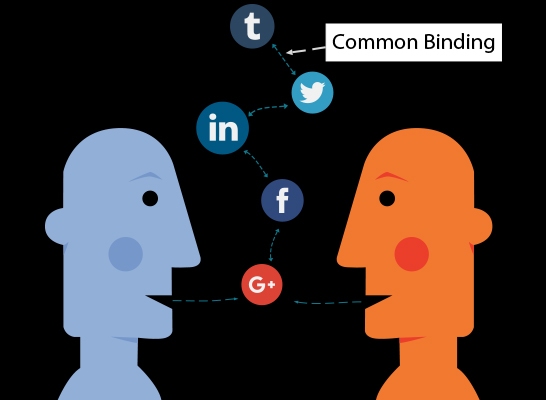
In the above image, more than one object has same common binding to accelerate the working efficiency. The reuse of the same code is a sensible idea, as introduced by Swift. For example using a verbatim code language Protocol Extensions to Bind Model classes with interfaces can be understood as under:

Let’s suppose we have a ‘User’ class:

class User {

var name = “”

var email = “”

var bio = “”

var image: UIImage? = nil

init(name: String, email: String, bio: String) {

self.name = name

self.email = email

self.bio = bio

}

}

Gradually a protocol will implement all the interfaces together that would be bind with the ‘User’ instances calling it ‘UserBindable’.

protocol UserBindable: AnyObject {
var user: User? { get set }

var nameLabel: UILabel! { get }
var emailLabel: UILabel! { get }
var bioLabel: UILabel! { get }
var imageView: UIImageView! { get }
}

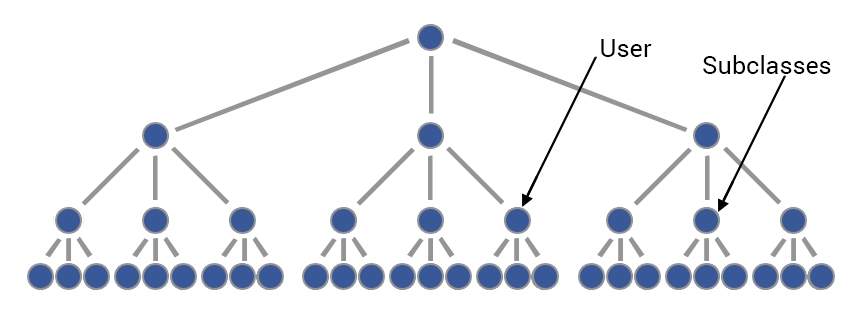
Here ‘User’ as an individual variable is a user (operator) to bind and all other ‘UIView’ the subclasses use to bind the user. The image below will clarify the above code understanding:

user-subclasses-protocol-extension-1

Now, let’s we create a protocol extension:
extension UserBindable {

// Make the views optionals

var nameLabel: UILabel! {
return nil
}

var emailLabel: UILabel! {
return nil
}

var bioLabel: UILabel! {
return nil
}

var imageView: UIImageView! {
return nil
}

// Bind

func bind(user: User) {
self.user = user
bind()
}

func bind() {

guard let user = self.user else {
return
}

if let nameLabel = self.nameLabel {
nameLabel.text = user.name
}

if let bioLabel = self.bioLabel {
bioLabel.text = user.bio
}

if let emailLabel = self.emailLabel {
emailLabel.text = user.email
}

if let imageView = self.imageView {
imageView.image = user.image
}
}
}

Here the extension is divided into two parts:

UIt table for cell value
  1. Default Value created that allows some exclusion and some inclusion.
  2. All the values of user properties and fix to view.

Presenting a user list, create a ‘UITableViewCell’.

class UserTableViewCell: UITableViewCell, UserBindable {

var user: User?

// we can set the labels in interface builder or with by code.
@IBOutlet weak var nameLabel: UILabel!
@IBOutlet weak var emailLabel: UILabel!
}

cell-bodu-content-image

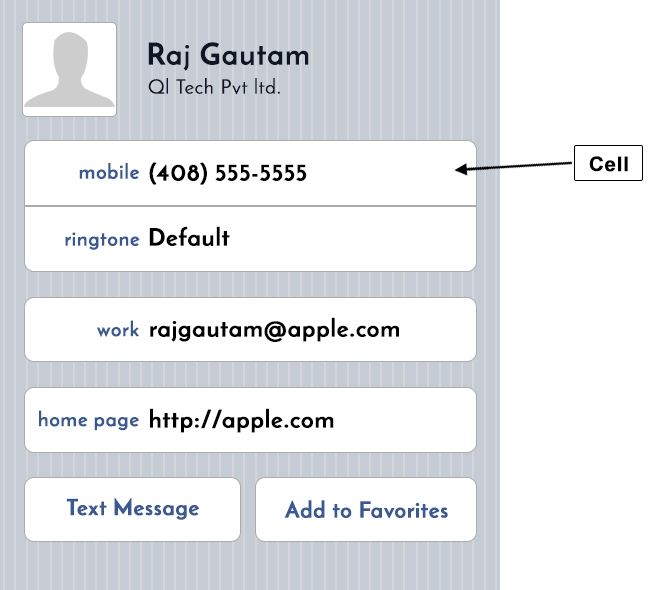
The above image indicates that the cell is binding the user through the use of the UserBindable protocol. This binds its interface to the user object.

In the UITableViewDataSource protocol, we can see the following object classes:

func tableView(tableView: UITableView, cellForRowAtIndexPath indexPath: NSIndexPath) -> UITableViewCell {
let cell = tableView.dequeueReusableCellWithIdentifier(“Cell”) as! UserTableViewCell
let user = // find the user from your array or whatever
cell.bind(user)
return cell
}

If we want to show the detail of this user after touching it, we can have a view controller like this:

class UserDetailViewController: UIViewController, UserBindable {

var user: User?

@IBOutlet weak var nameLabel: UILabel!
@IBOutlet weak var emailLabel: UILabel!
@IBOutlet weak var bioLabel: UILabel!
@IBOutlet weak var imageView: UIImageView!

override func viewDidLoad() {
super.viewDidLoad()
// here we suppose that we have set the user value before the viewDidLoad
bind()
}
}

code display by qltech

Thus, the above example codes shown the efficient use and output of reused binding code in android mobile app development.

                                                        Use `NSDateFormatter` efficiently

Creating NSDateFormatter is a tedious job for any android programmer. But one thing that is to be notified here is that all the formatters to be used in the app are static constant. They can be reused and no need to create them again and again. The image below is an example of showing static constant:

NSDateFormatter

Here in the above image the day changes but the formatters remain constant. Like the name of days, 12-hour format, the name of months and numbers from 0-9.

The example of the code is as follows:

extension NSDateFormatter {

@nonobjc static let shortDateAndTime: NSDateFormatter = {
let formatter = NSDateFormatter()
formatter.dateStyle = .ShortStyle
formatter.timeStyle = .ShortStyle
return formatter
}()

@nonobjc static let dayMonthAndYear: NSDateFormatter = {
let formatter = NSDateFormatter()
formatter.dateFormat = “MM/dd/yyyy”
return formatter
}()

@nonobjc static let monthAndYear: NSDateFormatter = {
let formatter = NSDateFormatter()
formatter.setLocalizedDateFormatFromTemplate(“MMMyyyy”)
return formatter
}()
}

Now in the above code, we can make out @nonobjc attribute. This means that the value is supposed to be added in the cell. A complaint of ‘A declaration cannot be both ‘final’ and ‘dynamic’.‘ is seen. If the formatter has applied for “DD/MM/YYYY” format, then the date should be “01/01/2000”. No object can be added (“001”) nor can be deducted (“1”). Similarly, notice that adding the @objc will make your extension incompatible with Objective-C.

Next, let’s we create an NSDate extension to make a simple API convert to strings and back:

extension NSDate {

/// Prints a string representation for the date with the given formatter
func string(with format: NSDateFormatter) -> String {
return format.stringFromDate(self)
}

/// Creates an `NSDate` from the given string and formatter. Nil if the string couldn’t be parsed
convenience init?(string: String, formatter: NSDateFormatter) {
guard let date = formatter.dateFromString(string) else { return nil }
self.init(timeIntervalSince1970: date.timeIntervalSince1970)
}
}

Let’s call the NSDate extension methods.

To create a String from a NSDate:

let date = NSDate()let string = date.string(with: .shortDateAndTime)// let string = date.string(with: .dayMonthAndYear)// let string = date.string(with: .monthAndYear)

To create a NSDate from a String

let string = “06/17/2016”
let date = NSDate(string: string, formatter: .dayMonthAndYear)

By looking at the several techniques and coding customizability that Swift provides, developers can have a field day with the process of iOS application development. This article barely gives a glimpse at the gates of the opportunity that Swift throws open for developers and designers. Would you like to know more, or would you be feeling the urge to share your inputs? Let us know so that we can explore the realm beyond the gates of opportunity together.

How To Make Money With A WordPress Blog

A blog is a valuable resource to own, a place where you can pen down what you think freely, without inhibitions and external influence. It is a true reservoir for the inner workings and musings of your mind. But are you satisfied? Maybe you are.

But, how about earning from what you really like doing? Now, the question you might be having is “How to make money?” with your WordPress blog. Let us help you understand how you can maneuver and manipulate this leading CMS according to your will to make the most returns out of the same.

One can use WordPress in either of the two forms offered:

  • WordPress.com: An Open platform where one can start blogging.
  • WordPress.org: A Self-hosted platform having one’s own server.

You may be surprised to know that many people are making a living by running a blog on WordPress. Have you ever wondered how you can do the same? Well, there can be many ways by which you can make money using WordPress. Listed below are few of the easiest and most popular ways:

USING WORD ADS

One of the easiest ways to generate decent revenue from your WordPress blog is by using WordAds. It is the advertising solution for WordPress.com which can be used by anyone. However, one of the prerequisites, in this case, is that you need to apply for it and wait until your request for WordAds gets accepted.

Some of the things that one should keep in mind while using WordAds are:

  • You can monitor your earnings from WordAds very easily by tracking the same from the dashboard.
  • The payment you receive from WordAds is based on impressions and not clicks. Thus, higher traffic leads to more earnings.
  • It works better when the web traffic is from North American and European countries.
  • Minimum denomination to receive payment is USD 100.0 and payment is made through Paypal account.

“Tip” of the Digital Iceberg: Note that you cannot use Google Adsense on a WordPress.com blog. However, if you are using an enterprise version of WordPress.com, you can definitely apply for AdSense.

AFFILIATE MARKETING

Another lucrative and intriguing way of earning through your WordPress blog is through the use of affiliate links. Now, what is affiliate marketing you might ask? Simply put, it is promoting other web pages on your blogs and helping them generate revenue. But, how? You help your affiliate site by generating higher web traffic and channelling the same to their blog or website, thus increasing the probability of higher sales. One of the best ways to go about affiliate marketing would be to use backlinks or hyperlinks in your article to link your content with your affiliate partners. However, an image with a backlink to an affiliate partner is not a lucrative option. Through affiliate marketing, you also gain a share of the returns that you help your affiliate partners produce. This method can generate quite a substantial amount of revenue in a very short duration.

THE BEAUTY OF AFFILIATE MARKETING IS THAT YOU DON’T HAVE TO INVEST THE TIME AND EFFORT TO CREATE A PRODUCT TO SELL. YOU CAN BEGIN SELLING SOMETHING AS AN AFFILIATE AS SOON AS YOU HAVE A PLATFORM TO SELL IT ON. @patflynn

SPONSORED POSTS

This is another method for generating money. However, this works better in the case of established blogs. One of the best ways of garnering a sponsored blog would be to write a review on some other blog with the consent or mutual agreement or writing or posting sponsored content related to similar interests, products, services or more.

Few important things to consider in this case are as follows:

  • It is advisable to use self-hosted WordPress platform, especially in case one wants to run a third-party advertising program.
  • You can get yourself suspended if you are caught violating WordPress.com advertising guidelines.

CREATING AND SELLING PLUGINS

WordPress blogs are mostly run by using one or several plugins. Thus, you must have realized the importance of plugins. There are thousands of plugins available for WordPress – some of them are absolutely free and the remaining are premium ones. Well, if you manage to create your own plugin, be sure to generate revenue from it by properly advertising the same.

You can sell your plugins at CodeCanyon or similar sites, or, you can also sell them from your own website. You can also opt to do freelance projects for developing plugins, on some of the major freelancing sites out there, such as Freelancer, Elance, Odesk, etc.

“Tip” of the Digital Iceberg: If you are thinking of making money by selling WordPress plugins, make sure to create them by focusing on a specific need, especially one which is faced by almost all bloggers but is still unsatisfied to a large extent.

DEVELOP WORDPRESS THEMES

You can also make money by developing WordPress Themes. You can do this by going solo or by joining a team. After developing a theme, you may sell it to websites such as Themeforest, Creative Market, Mojo Themes and more. These themes can also be put up for sale on your own website

OFFER WORDPRESS CONSULTING SERVICES

Another revenue-generating stream would be to offer consulting services for bloggers who are lost in the virtual realm. It can be related to anything from creating custom designs for clients or creating and teaching WordPress tutorials to beginners or even advanced users.

START YOUR OWN BLOG

You can use these tips to launch yourself into the world of blogging and emerge as a professional in your field of choice. So, what are you waiting for?

Are you making money through WordPress blog? Please share your experience and your methodology and help others join the bandwagon.

Building Quality Into WordPress Projects: A Practical Example

If you find that your website does not get traction as you expected, there might be problems with the quality of the website. Today WordPress is probably the best content management system around. There are various codes and plugins that can enhance the quality of your WordPress website thus attracting more visitors. WordPress tutorials for beginners available on the internet that depicts the use of WordPress development tools like plugins, themes, widgets, etc. There are some simple hacks by which you can optimize the quality, look and performance of a WordPress website.

Let’s take a look at them one by one to build Quality Into WordPress Projects.

Velocity page

Velocity page is a premium service that allows you to edit the page in real-time in a simple drag and drop way. There is no need to worry if you don’t have any coding or technical skills. Velocity page comes with WordPress plugins which allow you to effortlessly create spectacular web pages. It comes with various modules that allow you to create multimedia-rich pages.

Wordpress-Velocity-page

ThemeForest

WordPress comes with thousands of ready-made designs that can be installed on your website page. Themeforest allows you to buy themes and templates for customer management services (CMS) platforms like WordPress and Joomla. You can upgrade the quality of the website by choosing a simple yet effective WordPress theme and thus avoiding any complicated design with lots of unnecessary features. Themeforest provides premium paid themes as well as free themes. But if you are building a professional website for your business, then be ready to shell out some bucks. Quality comes at an expense.

Themeforest

Change compression of your WordPress image

WordPress comes with preloaded features that automatically compress the images for better performances. If you want to showcase high-resolution pictures in your website then you can disable image compression.

This can be done adding the below given code in the selected theme’s function.php file or installed plugin

add_filter(‘jpeg_quality’, function($arg){return 100;});

By inserting the above code, the quality of your image is set to highest. The difference in the quality of the image is visible.

Similarly, you can increase the compression of the image by adding the following code.

add_filter(‘jpeg_quality’, function($arg){return 75;});

Here {return75;}code reduces the size of the image from 100 to 75. This would reduce the image size thus loading your website more quickly. 

Boosting the speed of the website by W3 Total Cache

Long loading time for your WordPress website could be a huge turnoff for a visitor. W3 Total Cache is a very useful plugin that boosts up the speed of your website by reducing the load on your web server. This plugin would clear the cache in static and dynamic content, thus loading your page faster. The decreased webpage load time would obviously improve the user experience.

Wordpress-W3-Total-Cache

BJ Lazy Load

This is another great plugin that would improve the quality of your website by loading the content as and when the user scrolls down the webpage. The speed of the webpage is boosted as the server doesn’t have to load all the content at once.

Avoid installing too many plugins

WordPress provides hundreds of plugins for each and every requirement you need. But some of the plugins are not scripted well and thus can cause hindrance in the performance. Before installing a plugin, you should Google search the review of that specific plugin to check if other users faced any problems with it. My best advice would be to uninstall the plugin if it does not offer any significant enhancement in the performance of your website.

Avoid the use of Java Scripted social share buttons

Everybody wants to insert a social share button on the webpage. But inserting too many buttons (Facebook, Twitter, Google+, LinkedIn, Pinterest, etc.) would increase the loading time of the website.

Both Facebook and Twitter can share the website through a web link, thus avoiding the use of javascript buttons. Now, the links can be shared by twitter using the shortened URL of twitter. Below are the coding examples of the short social share URL.

<a rel=”nofollow” href=”http://twitter.com/home?status=Reading:%20<?php echo urlencode(get_the_title()); ?>%20&<?php the_permalink();?>” target=”_blank”>Share on Twitter</a>

<a rel=”nofollow” href=”http://www.facebook.com/sharer.php?<?php the_permalink();?>&<?php echo urlencode(get_the_title()); ?>” target=”_blank”>Share on Facebok</a>

Avoid-Java-Scripted-social-share-buttons

Yoast SEO

This option will make search engine optimization for your WordPress very easy. This is a boon, especially for WordPress Blogs. It will help your website get ranked higher on the internet. Improved ranking would lead to more subscribers to your page, and thus making your business grow faster.

Wordpress Yoast SEO

What is Marketing Automation?

All internet users must have experienced marketing automation, even if they are not aware of the term specifically. Think about Infusionsoft, Salesforce.com, Hubspot, MailChimp, Act-on, Marketo to name a few; these extremely popular services can be classified as examples of marketing automation.

Marketing automation

Marketing automation, as the name implies, is the use of IT-based tools to automate aspects of marketing, such as e-mail campaigns, social media posts, polling contests, offers, etc. Automation tools can help you in lead management, conversions, retention and feedback as well as provide insights for evaluation and future planning.

Industry Insight

Marketing automation services are plentiful! There exist offerings to suit

  1. All budgets- Services ranging from 100$ a month to 5000$ a month
  2. All marketing requirements- inbound, e-mail campaigns, social media
  3. All business sizes- serving a target base of a few hundred to a few hundred thousand customers

While it may appear to be the ultimate weapon in tackling all your online marketing woes, one needs to realize that it is simply the contemporary toolkit for a marketer functioning in the internet era. At its core, it still abides by fundamental marketing principles.

What do we mean by that? We mean that having an automation software alone will not help you in achieving your marketing goals. As a marketer, one needs to have a defined game plan, which can be accomplished with greater ease and effectiveness using a marketing software/service.

Remember, marketing automation is a mean and not an end!

What brought about the advent of marketing automation?

Tracing the evolution of the internet in a very general way, we can see why marketing automation became a norm, a necessity:

  • The internet became a new landscape of interaction, with hitherto unseen capabilities that were bound to be leveraged by both producers and consumers.
  • The ubiquity of the internet made it essential for brands to have an online avatar to remain credible.
  • As it went from ‘a virtual place that we visited’ to ‘a virtual space we live in’, brands had to adopt social media and other interactive platforms to be where customers are.
  • Extensive user behaviour tracking enabled greater insights and more sophisticated methods for conducting planned and targeted marketing activities.

With each step of the internet evolution, one can notice the corresponding evolution in the scope and focus of the marketing automation tools.

In fact, some companies in this space might object to their offerings being referred to as tools, and would be keen on emphasizing how they can be considered as platforms with comprehensive capabilities to execute marketing strategies, and not just complete marketing tasks.

What does marketing automation look like?

The best way to bring out the essence of marketing automation is to compare how a standard marketing objective would be accomplished with and without the use of an automation tool/platform.

ObjectiveNon-automatedAutomated Marketing
TargetingBuying bulk e-mail lists-mail blasts and push strategyInbound marketing attracting the right audience through content, social media
Data GatheringUnsystematic and infrequentUsers need to be pushed to provide dataSubtle and incentivized accumulation of dataSystematized and regular to enable analysis
Campaign tracking/managementControl predominantly over marketers actions without adequate information about the target’s responseDetailed behavioural information available, allowing for better analysis and modification if needed
Closing the saleStrong and overt promptsMultiple calls to actionPushing for sale irrespective of the prospect’s level of readinessA gentle experience with the prospect being taken through stages of awareness, persuasion and then a smart call to action
CR MFeedback generated haphazardly follow on based on generic conventions (events/occasions)Prospect sees the effort as another sales tacticEngaged customers (through a web portal, social media, etc.) who can be targeted based on insights to deliver customized messagesProspect sees effort as a value addition
Marketing integrationExtensive effort required to coordinate and synchronize multiple objectives and campaigns might result in a confusing clutter of activitiesAutomation services provide a wholistic perspective of the campaign and allow multiple activities/campaigns to be managed using a centralized system

Conclusion

If you are still not sure about adopting marketing automation for your business, here are some statistics:

  1. According to Infusionsoft, nearly 80% of top companies have incorporated marketing automation in their business.
  2. Investing in conversion rate optimization (CRO) solutions are guaranteed to deliver high ROI, as much as 223.7 %, according to VentureBeat.

Arm yourself with the tools of today and guide your marketing the right way with marketing automation.

The 9 Most Common Mistakes That Ionic Developers Make

Are you an ionic developer? Are you facing setbacks despite apparently doing everything right? Do you want to learn from the mistakes made by your peers? Or do you, as a computer geek, wish to gobble up anything and everything on the subject? If you fall in any of the above categories, then you should be aware of the mobile app framework, Ionic. For the rest of us, the lesser mortals, we will first understand what Ionic is and then we will look into the 9 most common errors than Ionic developers make.

So, what is Ionic?

Ionic is an open-source source-development-kit used for developing mobile apps. It was released in 2013 and has become a global platform in just 3 years. It is extremely popular and has been instrumental in the development of more than a million apps. There have been significantly updated releases after the initial launch and web technology has since then evolved significantly.

Why this list?

This list is to place emphasis on the common mistakes which act as ready reckoners for developers which one can refer to and avoid the fundamental problems that hinder the building of a robust and scalable framework.

Common Mistake#1: Forgetting to enable Native scrolling

Native scrolling enabled the use of infinite rolling and pull to refresh features without JavaScript scrolling. It also allows the framework to listen to scrolling events on supported web-views. It made a remarkable difference in the performance and user experience of the application.

Native Scrolling is enabled by default on Android since Ionic 1.2. Unfortunately, in the absence of events on iOS the “native scrolling” is not functional for the previous versions of the platform yet.

If you are using a version prior to 1.2, do not forget to enable Native Scrolling for Android using the Ionic Config Provider:

<pre><code class=”language-js hljs”><span class=”hljs-comment”>// Enable Native Scrolling on Android</span>
$ionicConfigProvider. platform.android.scrolling .jsScrolling(<span class=”hljs-literal”>false</span>);</code></pre>

If you wish to enable/disable native scrolling on one particular page, just use the following directive

in ion-content:

<pre><code class=”language-html hljs”><span class=”hljs-comment”><!– Disable Native Scrolling on this page only –></span>
<span class=”hljs-tag”><<span class=”hljs-title”>ion-content</span> <span class=”hljs-attribute”>overflow-scroll</span>=<span class=”hljs-value”>”false”</span>></span></code></pre>

Common Mistake #2: Missing out on the Ionic CLI

Iconic CLI has great features like, platform and plugin preference, which it adds to Cordova CLI.  The problem with Cordova CLI is that the features are machine specific and while sharing the same environment, platforms, and plugins, it is difficult to keep the project in sync between the systems. Iconic CLI helps to resolve these issues by helping the machines to remain synchronised.

Platforms and plugins are stored in Cordova platforms and cordova Plugins properties like this:

<pre><code class=”language-json hljs”><span class=”hljs-string”>”cordovaPlugins”</span>: [
<span class=”hljs-string”>”cordova-plugin-whitelist@1.0.0″</span>,
<span class=”hljs-string”>”cordova-plugin-inappbrowser@1.0.1″</span>,
<span class=”hljs-string”>”cordova-plugin-splashscreen@2.1.0″</span>
],
<span class=”hljs-string”>”cordovaPlatforms”</span>: [
<span class=”hljs-string”>”android”</span>,
<span class=”hljs-string”>”ios”</span>
]
</code>

Common Mistake #3: Thinking Performance can be an issue

Ionic is based on AngularJS, and performance is always a doubt. However, we think that is a myth and very good performance can be achieved through Ionic.

Several successful Apps have been developed through Ionic, some of which has a 9M+ user base, 7M+ downloads and an average of 4.5 stars on Google Play.

One can use $Watch and Track By to get better performance.

Common Mistake #4: Confusions with ‘View Cache’ logic

Does your app create cache? It is a very difficult question to answer for the novice developers. With Ionic, 10 pages are cached by default. This helpful feature can be of trouble to us if we are unable to understand the dynamic of cache pages.

The problem is that when the user returns to a cached page, the controller is not re-instantiated again, and everything is like the same as when you left that page. You can update the cache by using these particular lines of code, which can be both for global as well as per platform basis:

<pre><code>// Globally
$ionicConfigProvider. views.maxCache(5);

// Per platforms
$ionicConfigProvider. platform.android.views. maxCache(5);
$ionicConfigProvider. platform.ios.views. maxCache(5);</code></pre>

Common Mistake #5: Not knowing the capabilities of Crosswalk

Every Android version runs a different WebView. The performance of the OS varies from one device to another. In order to resolve the issue and deliver a similar performance on any of these versions, you can install Crosswalk. It works to create a sync between the working of your application and the latest Chromium browser. The crosswalk can be installed simply using Ionic CLI or Cordova CLI.

You can install Crosswalk simply using Ionic CLI or Cordova CLI:

<pre><code class=”language-bash hljs”>ionic plugin add cordova-plugin-crosswalk-webview</code></pre>

Common Mistake #6: Running Cordova plugins inside the browser

Most of the developers out there create Apps to run on iOS or Android. However, they make the elementary mistake of testing the same on the web browser. Well, you could, but only after you install the proper browser platform. It is not compatible with all plugins. One can debug very easily in Android remotely.

Common Mistake #7: Mismatching the Architecture and Application scale

Most people make the critical mistake of using a basic architecture in developing advanced applications. People face scalability issues which are not easily modifiable.

Common Mistake #8: Binding Events ton scroll, and Forgetting About requestAnimationFrame

One should be very careful while selecting or writing codes, the codes usually make or break an App. One should take care that anything that triggers a digest loop should be deferred and not triggered together with heavy painting, which also is the effect of scrolling.

Many things that can be achieved by binding to scroll events, can also be developed using a different method. Behold requestAnimationFrame

Common Mistake #9: Using Ionic Applications frameworks mechanically

There are several options available to developers like, Ionic Creator, which has a very helpful drag and drop feature, which can help reduce development time greatly. We should be using them rather than doing everything manually.

Conclusion

Ionic has changed the way mobile app development was done. It has brought about revolutionary changes and is still evolving. While adapting to different platforms will always be a challenge, the ability to function across environments is slowly becoming a prerequisite. However, this journey can be much less daunting if one accesses the plethora of resources available online. We hope that this post has removed some of the obstacles you are facing while working on Ionic.

3 MUSTS to grow your Business

Are you interested in entrepreneurship? Are you interested in starting up an entire digital kingdom of your own? Are you enthralled by the prospects of planning, processing and developing an entire market for yourself?

Well, then what is stopping you? Well, it looks like there are some snags that might be disrupting your rise to glory. Your business might be waiting to bloom, but due to the lack of some crucial elements, you might be missing out on a spectacle worth living for! You know what I am talking about. The moment when you realize that your business has broken beyond the bonds of its origin and is free to grow, develop and proliferate on its own.

Oh, wait.

But, where do you start all this? Let’s take an example just to give you an indication of the cardinal laws that govern the digital wilderness.

grow-Business

The 3 Cardinals of Online Business to Grow

#1 Design & Development

The first step that you have to take as far as climbing up the mountain of a task that digital empire building is, involves the planting of a seed of identity in a virtual space that your online business or website will call home. Developing an identity for your business is as important as developing a personality is for a child who matures from infancy to adulthood.

 The foundation of your identity is your website- which ultimately becomes your model to develop your app, digital advertisement, etc. There are 2 parts to this:

WEB DESIGN:

Designing is basically made up of everything that the viewer comes in contact with as soon as they land on your website. This includes the overall look and feel of your website.  The design of your site gives an apt indication of what elements your business is defined by as well as the inherent conceptualization of business model. We have only started to understand how revealing a design can truly be as far as sending out messages about your business as well as your intentions is concerned. Design is similar to the clothes that you wear, in that they reveal a lot about your personality as well as your mindset.

web design

The seed of identity of your website is sown through the process of logo design, where the intentions behind your business ideals are expressed artistically. The next phases of designing include aspects such as designing of the virtual space that your business calls home, which is embedded in the process known as website design.

WEB DEVELOPMENT:

Development basically takes care of all the background that that goes into making your site that is controlling how every icon, widget, tool works on your site. For this you need programmers who specialize in programming languages such as C++, HTML, Java, PHPBeing at the helm of an online business may involve the need to use special tools and plugins on your site, such as payment processors and API (Application Programming Interfaces).

The integration of plugins and templates is an especially significant point of consideration if you are nurturing your website on a CMS platform like Joomla or WordPress. CMS stands for Content Management System, a platform that enables users to create digital content equipped with low-level details and user-friendly interfaces. We can use this for controlling formatting, history editing, updating versions, managing search bars, integrating plugins, and more. This process of development changes and fluctuates on the basis of the CMS platform on which you are building your website, which means that Joomla development might differ heavily from WordPress development or Magento development.

Development of entire websites and digital empires can be done through the use of frameworks as well. These frameworks provide much greater freedom and flexibility as far as development is concerned, owing to the fact that they are made up of fixed patterns of methods and classes of code. The process of using frameworks for the development of a website includes the practice of Laravel developmentSmarty developmentDrupal developmentZen Cart development and Zend development.

#2 Marketing

Let’s face it, your business or website needs to have numerous channels through which it can express itself and reach out to people. A website or business without a dedicated target audience or consumer base is good as a tree without roots. The only way the website or business can grow is if it receives the nectar that all majestic digital creatures crave on the online medium, traffic!

  1. Know your message- This is the foremost thing you need to be clear about. What are you really advertising? What is it that you are putting out to your consumers? Always remember, what you are producing isn’t always the same as what you are advertising. The lack of proper communication can ultimately be the end of your business or website. Without a voice and an intention, your website will be left out in the vast market of the digital space, with no one to notice it or to acknowledge its presence.
  2. Know your audience– The motive or intention behind your website or product determines your target audience. A matte lipstick brand will target women in their 20s-30s, while a domestic drill will target husbands. Therefore, once you get the statistics of the specific target population to which your product/service appeals the most. You can initiate the process of increasing connectivity and strengthening the bonds within and without the business.
  3. Know your medium– In order to truly allow your business to grow beyond the bounds which it was created within during the inception phase. You need to understand how your customers interact and grow with the content/product/service that you offer them. This is of special significance as far as choosing a platform or medium of advertising is concerned. By using different mediums of advertising, you can start paying attention to the various aspects that your audience pays attention to. The medium you use defines the criteria that audiences employ to consume your product or service. Hence, by understanding the behaviour of your audience on different mediums, you can play around with the various tactics and techniques by tailoring them according to the differences that are evident among different mediums.

The techniques, in this case, include aspects such as digital marketingcontent marketing and social media marketing.

#3 Automation

Automation is another word for response, and is a distinct process which involves both users and producers on the same platform. To be more specific, it is a process that often blurs the lines between plain digital marketing. And more advanced software-based techniques of monitoring and analysis. Marketing Automation refers to the use of various software-based tools. Which can be used to convert repetitive processes into fully automated processes within the body of the business or the website. This is similar to converting certain processes involved in the development and marketing realm of the businesses into functions which occur involuntarily. Imagine this to be similar to shaping involuntary functions of a living organism, such as breathing, pumping of the heart as well as aspects such as digestion.

How can you make use of this?

Marketing automation is the ultimate tool for any aspect of online business development. Often defined by optimum assembly-line software, marketing automation lets you effectively handle your consumer base. Right from targeting the right audience to market integration. This helps you to be constantly connected with your consumers. Through offer-announcing SMSs, appraising emails and active polls, social campaigns and market funnelling techniques. Without the need to worry about maintenance and management.

Marketing automation

by making use of tools like Infusionsoft can cause immense returns for your business. This is possible due to the fact that it creates the opportunity for business owners to automate processes such as market funnel management, API integration, sales cart automation, and more. There are several other tools and practices for ensuring that you gain mastery over the process of automated marketing.

So, there you go mate- you have successfully summed up the stepping stones of online business development. Although reading material isn’t all that goes into building your empire, it is better to know the depth of the water before you cross the river, isn’t it?

Do let us know your queries, insights and opinions on these aspects that we have explored.

Eliminate These 5 Wastes to Optimize Your Software Development Once and For All

The IT sector is a powerful medium for the creation and management of profound tools and applications. However, the great amount of power that the sector provides to the user does not come exempt from waste and unnecessary baggage. More often than not, these wastes and unnecessary elements that hinder the proper functioning of applications and technologies are caused due to human error. But, let’s face, we humans are not exactly “perfect”. So, here are some pockets of waste that need to be taken care of if the imperfect human wants to perfect waste management in IT.

Software Development

Garbage #1: Partially done work

This element in IT is the waste that lines the backend of any application or software that one is creating. Bits of unstructured code, along with those parts of the code which have not been tested form a major part of this type of waste. Other than these aspects, other elements within this type of waste also include pieces or strings of code which cannot be deployed.

Let’s make it simpler: These bits and pieces of unusable and waste code are like the long lines in a story that ultimately do not contribute in any way to the entire essence of the story as a whole. Consider them like the characters in a story that are added into it at the last moment just to add a particular flavour or feel to the story as a whole.

Red Herring is the name given to a character or element in a movie which do not serve any other purpose other than to distract or mislead the audience from the actual essence of the movie.  

Eradication Tactics: The essence of this problem arises from a lack of alignment between tasks and responsibilities, as well as between the team members themselves. Ensuring that important tasks are performed completely and not left asunder is an important part of the equation. The members on your team should be capable of handling different tasks and should have diverse roles so that a deadlock is avoided in all possible cases. There also has to be constant coordination between your team and the product owner at all times, so that the line of communication is maintained to the highest extent.

Garbage #2: Extra Features

 We all love the enthusiasm. It is one of the most valuable assets that a person can have in the IT sector. But then again, valuable assets have a large capability to cause immense fallout and unnecessary waste. Enthusiasm is good until it produces more harm than value. This becomes especially visible when it comes to your team producing more features than are required by the product owner, or the customers themselves.

Let’s make it simpler: Do you know how a nuclear reaction works? Well, you do not need to because that will just make things more difficult. However, the basis of a nuclear reaction is that it involves disintegration of a substance or the merging of two substances. Well, a simple thing really, right? But, add enough features and mechanisms to it and you have created a tool for large scale destruction! This is how adding features might turn out for you as well.

Eradication Tactics: This element requires careful planning as well as execution. For the plan to be created and subsequently implemented, you need to know the requirements of both your product owner as well as your target audience. Once you know what they need and what elements they would be comfortable with, you only need to concentrate on those instead of adding unnecessary elements.

Garbage #3: Hand-Offs

This element involves the transferring of work from one web developer to another in order to place emphasis on diversity of function. Even though this is an important element as far as working together in a team is concerned, it can become a huge burden when it comes to distributing tasks within a single project among individuals who are in different locations. There is bound to be a lack of communication and efficiency in this case owing to the fact that the entire essence of the information does not get conveyed to the individual on the other side. Another important malfunction due to this can be the lack of clarity between different employees on the same topic.

software development

Let’s make it simpler: When a group of people listen to a song, they all have different perspectives towards the same. You cannot expect two people to interpret the same song in exactly coherent ways. Which would be quite idealistic, to say the least. However, if you are a part of the group who created the song itself. You will observe that all the members of the group will have a lot of commonalities as far as the song and its meaning to them is concerned.

Eradicating Tasks: The best way to reduce hand-offs is to keep the entire project in a single location. Which can ensure a high degree of clarity as well as synchronicity between the members participating in the creation process as a whole.

Garbage #4: Delays

Well, this is one of those pockets of waste that all of us have been a victim to at some point or the other. This essentially involves the inability to adhere to timelines, as well as the missing of crucial value-addition specifics due to the lack of time management capacity.

Let’s make it simpler: Delays are like those gloomy monsoon days when you just do not feel like doing anything. And want to just sit at home doing nothing. Whenever a delay occurs, it has the ability to numb you and considerably affect the creative process as a whole. Resulting in considerable risks to the overall project itself. For instance, if a delay occurs, one resides in a space that I like to call “The Place of the Damned”. Where you are constantly bombarded with thoughts that cause you to gradually lose all hope in your own abilities as a whole. This is not too dissimilar to the caverns of Hell where the damned are tortured for their sins for ages on end.

Eradication Tactics: Delays can be eradicated by ensuring that the project or task at hand is divided into separate elements. Or individual responsibilities, so each and every task can be managed with the intense dedication that it requires. Moreover, one should determine the important tasks within the project. And differentiate them from the tasks which are not that important in comparison.

Garbage #5: Task Switching

This is where most teams fail to complete their projects and seem to be unable to achieve their targets as a whole. If your team tends to too inclined towards adopting a wavering approach towards your software or Web development process as a whole. It is more than apparent that there might be some serious problems in the processes and systems that you have adopted.

Let’s make it simpler: Have you seen machines on an assembly line? Yeah, the ones which have specific functions and perform only those for which they have been programmed to. Well, if you treat your team members in a similar fashion, then you can get your job done in a better way by “hiring” machines to do the same. However, if you want some real creation to happen. It is better if you involve your team members in a wholesome way. Especially as far as application or software development is concerned.

Eradication Tactics: In order to ensure that waste due to task switching is avoided to the maximum extent. It is important to acknowledge and appreciate the role of each and every team member to the fullest. The only way in which task switching can be managed to a large extent is by ensuring that each team member is involved in the project on a larger level than mere “workers”.